
Real-time multimodal translation helps people communicate across languages by translating more than typed text. It can process speech, captions, images, gestures, on-screen content, and other signals to make conversations faster and more natural. This guide explains how the technology works, where it is useful, what to look for in translation software, and how teams can use it responsibly.
What is real-time multimodal translation?
Real-time multimodal translation is translation technology that interprets language from multiple input types and delivers output with minimal delay. Instead of relying only on written text, it may combine speech translation, live captions, image recognition, document parsing, and contextual cues from a meeting, app, classroom, or device. The goal is not just to convert words from one language to another, but to preserve meaning across the way people actually communicate.
Traditional translation software often begins with a clear text source: a sentence, paragraph, file, or webpage. Real-time translation systems work in a more fluid environment. They may listen to a speaker, identify the language, separate background noise, recognize what is being said, translate it, and present the result as audio, captions, or text while the conversation continues.
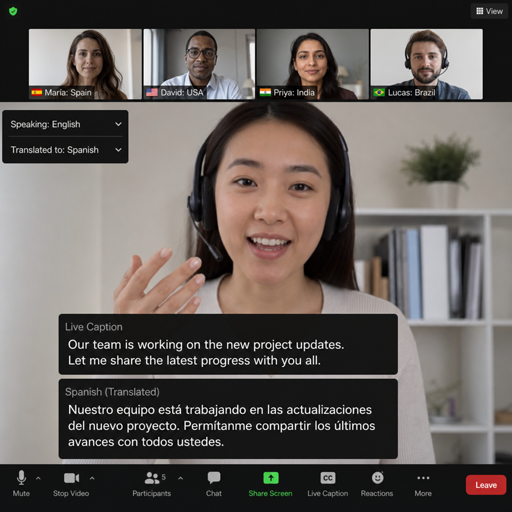
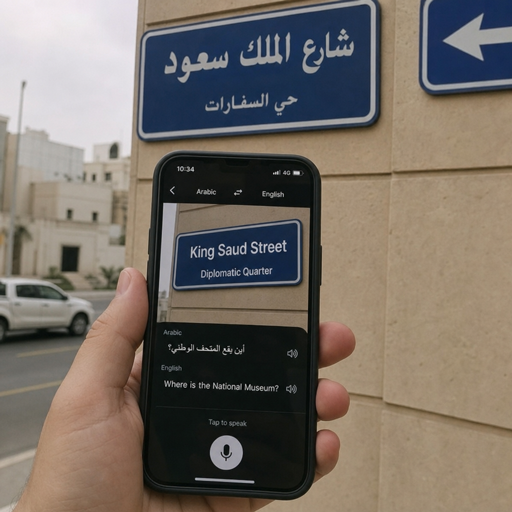
The “multimodal” part matters because human communication is rarely one-dimensional. A traveler may point a phone at a sign, ask a question aloud, and receive an instant translation. A global team may watch a shared screen while listening to a presenter and reading translated captions. A customer support agent may need to understand spoken comments, uploaded screenshots, and written chat messages in the same interaction.
Why multimodal communication changes translation
Multimodal communication gives translation systems more context, which can improve the usefulness of the output. Spoken words alone may be ambiguous, but surrounding information such as visual content, speaker turns, document structure, or chat history can help clarify intent. This is especially important in live environments, where people do not have time to rewrite unclear sentences or wait for manual review.
For example, the word “charge” could refer to billing, electricity, legal action, or responsibility. In a support call about a phone battery, visual or conversational context can help the software choose a more appropriate translation. In a medical appointment, a diagram or form may provide clues that a generic phrase would miss. In a classroom, slides and speech together may help learners follow technical terms more easily.
Multimodal systems also make translation more accessible. Some users need spoken output, while others prefer captions. Some environments are too noisy for audio playback, while others make reading difficult. When instant translation can move between speech, text, and visual formats, it becomes more flexible for different people, settings, and devices.
How the technology works in practice
Real-time multimodal translation usually depends on several connected steps. Each step has to be fast enough to support a live experience, but accurate enough to avoid confusing the user. The exact design varies by platform, yet most systems follow a similar flow.
- Input capture: The software receives audio, text, image, video, screen, or document input from a device or application.
- Signal processing: It cleans or structures the input, such as reducing background noise, detecting text in an image, or separating speakers.
- Recognition: Speech becomes text, printed words are extracted, and visual elements may be classified or described.
- Language detection: The system identifies the source language and sometimes switches automatically when speakers change.
- Translation: The content is translated into the target language using models trained to handle grammar, meaning, and context.
- Output generation: The result appears as captions, translated text, synthesized speech, subtitles, or another usable format.
- Context updating: The system uses recent conversation history and available visual cues to refine ongoing translation.
The challenge is latency. In a live conversation, even a few seconds can feel disruptive if speakers are trying to respond naturally. Strong real-time translation tools balance speed and accuracy by translating in smaller chunks, predicting sentence direction, and updating output when additional context arrives.
Speech translation
Speech translation combines automatic speech recognition with machine translation and, in some cases, text-to-speech. The system must handle accents, pauses, interruptions, technical vocabulary, and background noise. Unlike polished written content, live speech often includes fragments, self-corrections, filler words, and incomplete sentences.
Good speech translation does more than transcribe. It should preserve the speaker’s intent while producing language that sounds natural to the listener. This may require reordering words, adapting idioms, and choosing phrasing that fits the setting.
Visual and text-based translation
Visual translation can include signs, menus, labels, product packaging, handwritten notes, screenshots, slides, or documents. The software may use optical character recognition to extract visible text before translating it. In some systems, it can also interpret layout, so translated content appears close to the original position.
This is useful when the visual format carries meaning. A table, warning label, button, or form field is not just a string of words. Its placement and relationship to other elements help the user understand what to do next.
Context-aware output
The strongest translation software uses context carefully. It may consider the previous sentence, the topic of a meeting, a glossary, speaker identity, or the content displayed on a screen. This helps with names, product terms, repeated phrases, and specialized vocabulary.
Context should not mean uncontrolled guessing. Reliable systems need clear boundaries, especially in legal, healthcare, finance, and safety-related settings. When the stakes are high, instant translation can support communication, but it should not replace qualified human interpretation where accuracy, consent, or compliance is required.
Where real-time translation creates value
Real-time translation is most valuable when speed, accessibility, and shared understanding matter at the same time. It helps people act in the moment instead of waiting for a document, transcript, or human follow-up. That makes it useful across both everyday and professional settings.
Common use cases include:
- International meetings: Teams can follow discussions through live captions, translated audio, or multilingual chat.
- Customer support: Agents can communicate with customers who submit voice notes, screenshots, and written messages in different languages.
- Travel and hospitality: Users can translate signs, directions, menus, and spoken questions while moving through unfamiliar environments.
- Education and training: Learners can follow lectures, slides, captions, and discussion in a preferred language.
- Events and webinars: Organizers can offer translated captions or audio tracks for remote and in-person audiences.
- Healthcare intake and navigation: Staff can support basic communication around forms, directions, and scheduling, while escalating sensitive conversations appropriately.
- Field work and inspections: Workers can translate labels, manuals, warnings, and spoken instructions at the point of need.
The practical benefit is reduced friction. People do not need to stop every interaction to copy text into a separate tool. Translation becomes part of the workflow: embedded in a call, camera, browser, collaboration platform, service desk, or mobile app.
How should teams choose translation software?
Teams should choose translation software by matching the tool’s input modes, languages, accuracy needs, integrations, privacy controls, and user experience to the situations where it will be used. A system that works well for travel may not be appropriate for regulated business conversations. The right choice depends on what must be translated, how quickly it must appear, and what risks are involved if the output is wrong.
Start with the communication channels. If your team works mainly in video meetings, prioritize live captions, speaker handling, and meeting-platform integration. If users need to translate documents and screenshots, evaluate visual text recognition and layout handling. If frontline staff use phones or tablets, test the experience in real locations with real noise, lighting, and connectivity conditions.
A practical evaluation checklist includes:
- Supported modes: Does it handle speech, text, images, documents, captions, and screen content?
- Language coverage: Are the required language pairs supported for both input and output?
- Latency: Is the delay short enough for conversation, training, or support?
- Accuracy in context: Does it handle accents, domain terms, names, abbreviations, and incomplete speech?
- Output options: Can users choose subtitles, transcripts, voice playback, or side-by-side text?
- Glossaries and terminology: Can the tool preserve product names, brand terms, and technical vocabulary?
- Privacy and retention: What happens to audio, video, text, transcripts, and uploaded images?
- Accessibility: Does it support captions, readable formatting, keyboard access, and assistive technologies?
- Integrations: Does it fit into existing meeting, chat, support, learning, or content systems?
- Escalation path: Can users flag uncertain translations or involve a human interpreter when needed?
Testing is essential. Use sample conversations that reflect real use, not just clean demo sentences. Include background noise, fast speakers, industry terms, mixed-language phrases, and visual content that users actually encounter.
Best practices for better results
Even advanced translation technology performs better when people use it thoughtfully. Clear communication, good setup, and realistic expectations make instant translation more reliable.
Prepare the environment
Use a quality microphone, reduce background noise, and ask speakers to take turns when possible. In meetings, encourage participants to state names, avoid talking over each other, and share materials in advance if the platform can use them for context. For visual translation, improve lighting and frame the text clearly.
Write and speak for translatability
Shorter sentences are easier to translate in real time. Avoid unnecessary idioms, sarcasm, dense acronyms, and culture-specific references when the audience is multilingual. If technical terms are unavoidable, define them early and use them consistently.
Use glossaries for important terms
Organizations should maintain approved translations for product names, service terms, safety language, and recurring phrases. A glossary helps translation software stay consistent and reduces the chance that important terminology changes across conversations, documents, and support channels.
Make uncertainty visible
No real-time translation system is perfect. Interfaces should make it easy to review transcripts, correct terms, repeat key points, or ask for confirmation. In sensitive settings, users should know when a translation is machine-generated and when a qualified human should be involved.
Limitations and risks to understand
Real-time multimodal translation can be powerful, but it has limits. Errors may come from the original audio, the recognition step, the translation model, or missing context. A noisy room can produce a flawed transcript, and a flawed transcript can lead to a flawed translation.
Cultural nuance is another challenge. Words may translate correctly while tone, politeness, humor, or implied meaning changes. Legal disclaimers, medical advice, safety instructions, and contractual language require extra caution because small wording differences can have significant consequences.
Privacy also deserves attention. Multimodal communication may include voice, faces, documents, screens, locations, or sensitive personal information. Before adopting a tool, organizations should understand data handling, storage, access, consent, and administrative controls.
The future is more integrated and more human-centered
Translation technology is moving toward systems that feel less like separate tools and more like built-in communication layers. Instead of opening a standalone app, people increasingly expect real-time translation inside meetings, messaging, cameras, browsers, customer service platforms, and workplace software. The experience will become more useful as systems better understand context, preserve terminology, and adapt output to each user’s needs.
The most successful use of real-time multimodal translation will not be about replacing human communication. It will be about helping people participate when language would otherwise slow them down or exclude them. Used well, it supports faster collaboration, broader access, and more inclusive multimodal communication across borders, devices, and everyday conversations.
