
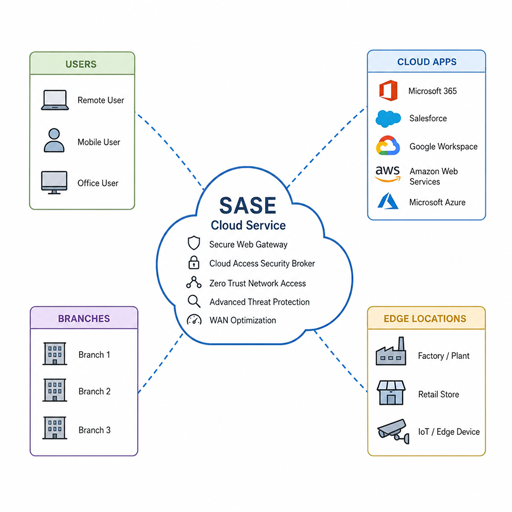
Secure Access Service Edge SASE is a modern approach to connecting users, devices, applications, and data through a unified cloud-delivered security and networking model. Instead of forcing traffic through a traditional data center perimeter, SASE brings secure access closer to where work actually happens: in cloud applications, branch locations, remote environments, and edge computing scenarios. This guide explains how SASE works, why it matters, and what organizations should consider before adopting it.
What is SASE architecture?
SASE architecture combines network security and wide-area networking capabilities into a single, cloud-based service model designed to secure access from anywhere. In practical terms, it helps organizations protect users whether they are in an office, working remotely, connecting from a branch site, or using cloud-hosted applications outside the traditional corporate network.
The idea behind SASE is simple: the old perimeter is no longer enough. Many organizations now rely on SaaS tools, public cloud platforms, hybrid work, mobile devices, third-party access, and distributed infrastructure. When users and applications are no longer concentrated in one physical location, security also has to become more distributed, identity-aware, and cloud-native.
A SASE model typically brings together capabilities such as secure web gateway, cloud access security controls, zero trust network access, firewall-as-a-service, software-defined WAN, and centralized policy management. The exact components can vary by provider and deployment strategy, but the goal remains the same: deliver secure access consistently, without requiring every connection to pass through legacy network chokepoints.
The shift from perimeter security to secure access everywhere
Traditional network security was built around a clear boundary. Users worked inside an office, applications lived in a data center, and security tools guarded the edge of that environment. If someone was inside the network, they often had broader access than they truly needed; if they were outside, they typically connected through remote access tools such as VPNs.
That model became harder to manage as cloud adoption accelerated. Applications moved out of the data center. Employees began working from many locations. Devices diversified. Business partners, contractors, and temporary users needed access to specific systems. At the same time, attackers increasingly targeted identities, endpoints, misconfigurations, and unmanaged access paths.
SASE responds to that shift by focusing less on network location and more on identity, context, policy, and risk. The user’s role, device posture, requested application, location, and session behavior can all influence whether access is allowed, blocked, or limited. This is where SASE aligns closely with zero trust: no connection is automatically trusted simply because it originates from a known network.
In a SASE environment, security inspection and access decisions happen through distributed cloud enforcement points. That makes it possible to apply consistent controls across remote access, branch connectivity, cloud security, and internet-bound traffic. For organizations with hybrid workforces or multi-cloud environments, that consistency can be more valuable than any single security feature.
Core components that make SASE work
SASE is not one tool. It is an architecture that combines several technologies into a more unified operating model. Understanding the main components helps clarify why SASE can improve both security and user experience.
Zero trust network access
Zero trust network access, often abbreviated as ZTNA, provides secure access to specific applications instead of placing users broadly on the network. Rather than granting a remote user general network-level connectivity, ZTNA evaluates the user, device, and request before allowing access to a defined resource.
This reduces the risk of excessive access. If a contractor only needs one internal application, they should not automatically receive visibility into unrelated systems. If a device fails a security check, access can be denied or restricted until the issue is resolved.
ZTNA is especially important for remote access because it replaces the “connect first, control later” pattern common in older VPN models. The result is more precise access, better segmentation, and a smaller attack surface.
Secure web gateway
A secure web gateway helps protect users when they access the internet. It can enforce acceptable use policies, block malicious destinations, inspect web traffic, and reduce exposure to phishing, malware, and risky content.
In a SASE model, these controls are delivered from the cloud rather than only through appliances in a central office. This matters because remote users may never pass through a corporate firewall unless traffic is backhauled, which can create latency and complexity. A cloud-delivered secure web gateway allows protection to follow the user more naturally.
Cloud access security controls
Cloud security is a major reason organizations consider SASE. SaaS applications and cloud platforms often contain sensitive data, but they may be accessed from unmanaged networks and many device types. SASE can help apply controls over which cloud services are allowed, how data is handled, and whether risky behavior should trigger action.
These capabilities may include visibility into sanctioned and unsanctioned cloud services, policy enforcement for data movement, and risk-based controls for user sessions. The purpose is not to slow down cloud adoption, but to make it safer and more governable.
Firewall-as-a-service
Firewall-as-a-service moves firewall capabilities into a cloud-delivered model. Instead of relying only on hardware appliances at fixed locations, organizations can enforce firewall policies through distributed service points.
This is helpful for branch offices, mobile users, and distributed teams. It can also simplify updates and policy management because controls are administered centrally while enforcement happens closer to the user or traffic source.
Software-defined WAN
Software-defined WAN, or SD-WAN, improves how traffic moves between branches, cloud services, data centers, and the internet. It can help organizations use multiple connectivity options more intelligently and route traffic based on performance, cost, or business priority.
When SD-WAN is integrated with security services in a SASE model, networking and security decisions work together rather than in separate silos. For example, branch traffic to a trusted cloud application may take a more direct path, while higher-risk traffic receives deeper inspection.
How does SASE improve remote access?
SASE improves remote access by making access decisions more identity-based, application-specific, and context-aware. Instead of treating remote users as outsiders who must tunnel into the corporate network, SASE gives them secure access to the resources they need while applying security controls consistently wherever they connect.
This is a meaningful change for both users and IT teams. Employees can reach approved applications without unnecessary detours through a distant data center. Security teams can reduce overbroad network access. Administrators can manage policies centrally rather than maintaining separate rules across VPN appliances, firewalls, cloud tools, and branch systems.
A SASE approach can support remote access in several practical ways:
- Application-level access: Users are connected to specific applications, not the entire network.
- Identity-driven policy: Access can depend on user role, group membership, authentication strength, and risk level.
- Device posture checks: Devices can be evaluated for security health before access is granted.
- Adaptive controls: Policies can change based on context, such as location, session risk, or unusual behavior.
- Reduced reliance on backhauling: Traffic can be inspected closer to the user instead of routed through a central data center.
- Consistent enforcement: The same access principles can apply to office, remote, and branch users.
For the end user, the benefit is often a smoother experience. For the organization, the benefit is tighter control. That combination is one reason SASE has become closely associated with hybrid work and distributed operations.
Business benefits of SASE architecture
The value of SASE is not limited to technical consolidation. It can also support broader business goals such as operational efficiency, improved resilience, safer cloud adoption, and better support for flexible work. The strongest benefits usually appear when networking and security teams treat SASE as an architecture shift rather than a product swap.
Stronger security through consistent policy
Security gaps often emerge when different environments use different tools and rules. A branch office may be protected by one firewall policy, remote workers by another, cloud applications by separate controls, and internet access by yet another stack. This fragmentation makes it harder to know whether users are being protected consistently.
SASE helps centralize policy design while distributing enforcement. Security teams can define rules based on identity, application, data sensitivity, device status, and risk. Those rules can then be applied across many access paths.
Consistency is especially important during organizational change. When teams open a new branch, adopt a new SaaS application, or support more remote workers, security policies should not have to be rebuilt from scratch every time. A SASE architecture provides a more repeatable model.
Better alignment with zero trust
Zero trust is based on the principle that trust should not be granted automatically. Every access request should be evaluated, and users should receive only the access required for their role and task.
SASE supports zero trust by making access more granular and dynamic. It can verify identity, assess device posture, evaluate context, and limit exposure to specific applications. This helps reduce the risks associated with compromised credentials, unmanaged devices, and overly permissive network access.
Zero trust is not a single product, and SASE does not automatically make an organization fully zero trust. However, SASE can provide an architectural foundation that makes zero trust policies easier to apply at scale.
Improved user experience
Security tools can create frustration when they add too much friction. Traditional VPNs may become overloaded, introduce latency, or force traffic along inefficient routes. Users may experience slow application performance, frequent reauthentication, or inconsistent access depending on where they work.
SASE can improve the experience by placing security services closer to users and applications. When policies are applied through distributed cloud points of presence, traffic may avoid unnecessary trips through centralized infrastructure. This is particularly useful for users accessing SaaS applications, cloud platforms, and internet-based services.
A better user experience also supports security outcomes. When approved access is simple and reliable, users are less likely to seek workarounds. That makes policy compliance more natural rather than something employees feel forced to fight.
Simplified operations
Many organizations accumulate security tools over time. One product handles remote access, another protects web traffic, another manages cloud visibility, another secures branches, and still others enforce firewall rules. Each may have its own console, policy language, reporting model, and maintenance cycle.
SASE can reduce that complexity by consolidating functions under a unified architecture. This does not mean every organization must replace everything at once. It means the long-term operating model becomes more coherent: fewer disconnected controls, more centralized visibility, and better alignment between network security and connectivity.
Operational simplicity can also help lean teams. When policies are easier to manage, teams spend less time troubleshooting overlapping tools and more time improving security posture.
More scalable cloud security
As cloud usage grows, security must scale with it. Backhauling cloud-bound traffic through a data center can create bottlenecks. Managing separate security rules for each environment can create inconsistency. Relying on location-based trust can leave gaps when users connect from anywhere.
SASE helps cloud security scale by inspecting traffic and enforcing policy through cloud-delivered services. It can provide visibility into cloud application usage, protect users accessing SaaS platforms, and apply controls based on data sensitivity or user risk.
This approach supports cloud-first strategies because security is designed for distributed access from the beginning. Instead of treating cloud as an exception to legacy architecture, SASE treats cloud as a normal part of the enterprise environment.
SASE and edge computing
Edge computing moves processing, data, or services closer to the locations where they are needed. This might include branch sites, retail environments, manufacturing facilities, healthcare locations, or other distributed environments where latency and local performance matter.
SASE complements edge computing by providing a security and connectivity model that is also distributed. If workloads, users, and devices operate at the edge, security enforcement should not depend entirely on a distant data center. Cloud-delivered controls can help protect traffic, authenticate users, and enforce policy closer to where activity occurs.
This relationship becomes important as organizations connect more locations, devices, and services. Edge environments may not have large IT teams on site. They may depend on direct internet access, cloud applications, and operational systems that need reliable connectivity. SASE can help create a consistent security layer across these locations without requiring each site to become a miniature data center.
SASE compared with traditional network security
SASE does not make every traditional security tool obsolete overnight. Many organizations will continue to use data center firewalls, endpoint protection, identity platforms, and other controls. The difference is that SASE changes the center of gravity from fixed perimeter defense to distributed secure access.
|
Area |
Traditional model |
SASE model |
|---|---|---|
|
Primary assumption |
Users and apps are mostly inside the network |
Users, apps, and data are distributed |
|
Access method |
Network-level access, often through VPN |
Identity- and application-based secure access |
|
Security enforcement |
Concentrated at data centers or office edges |
Distributed through cloud service points |
|
Cloud application access |
Often routed through legacy controls |
Protected through cloud-native inspection and policy |
|
Remote work support |
Frequently added as a separate layer |
Designed as a core access pattern |
|
Policy management |
Often fragmented across tools |
More centralized and consistent |
|
User experience |
Can involve backhauling and latency |
Can route traffic more directly with security applied |
The practical implication is that SASE is better suited to organizations where work is no longer tied to one physical network. It gives security teams a way to protect access without rebuilding the old perimeter around every user, branch, and cloud application.
When should an organization consider SASE?
An organization should consider SASE when its users, applications, data, or branch locations have become too distributed for traditional perimeter security to manage effectively. It is especially relevant when remote access, cloud security, network security, and branch connectivity are being handled by separate tools that create complexity or inconsistent protection.
SASE may be a strong fit if several of the following conditions apply:
- Employees frequently work outside corporate offices.
- SaaS and public cloud applications are business-critical.
- VPN performance or scalability is a recurring concern.
- Branch offices need secure direct internet access.
- Security policies differ across locations or user groups.
- IT teams manage too many disconnected network security tools.
- The organization is adopting zero trust principles.
- Contractors, partners, or temporary users need limited application access.
- Cloud security visibility is incomplete or fragmented.
- Network performance and security decisions are managed separately.
SASE is not only for large enterprises. Any organization with distributed users and cloud-based work can benefit from the principles behind it. The right timing depends on current pain points, security maturity, existing contracts, and how quickly the organization is moving toward cloud and hybrid work.
Planning a SASE adoption strategy
A successful SASE rollout starts with architecture, not procurement. Buying a platform before understanding access needs can lead to tool overlap, policy confusion, or unrealistic expectations. The better approach is to map how users connect today, where sensitive data lives, which applications matter most, and where risk is concentrated.
1. Assess the current access environment
Begin by documenting how users, devices, branches, and applications connect. Identify which traffic flows through VPNs, which traffic goes directly to cloud services, which tools inspect internet access, and where policy enforcement is inconsistent.
This assessment should include business context. A finance team accessing sensitive systems has different requirements than a temporary contractor using one project platform. A branch office with operational technology may need different controls than a small sales office using mostly SaaS applications.
2. Define security and business goals
SASE projects work best when goals are specific. “Improve security” is too broad. More useful goals might include reducing broad network access, improving remote access performance, centralizing policy management, protecting SaaS usage, or simplifying branch connectivity.
Clear goals also help teams prioritize. If remote access risk is the biggest problem, ZTNA may be the first focus. If branch connectivity is the challenge, SD-WAN and firewall-as-a-service may come earlier. If cloud application usage is difficult to govern, cloud security controls may lead the roadmap.
3. Build around identity
Identity is central to SASE. Access decisions depend heavily on knowing who the user is, what role they have, how they authenticated, and whether the request matches expected behavior.
Organizations should review identity providers, multifactor authentication, role design, privileged access practices, and lifecycle management. Weak identity processes can limit the effectiveness of SASE because the architecture depends on reliable identity signals.
4. Start with high-value use cases
A phased rollout is usually more practical than a large, disruptive cutover. Common starting points include replacing or reducing VPN use for specific applications, securing remote workers, protecting internet access, or modernizing branch connectivity.
Each phase should produce measurable operational learning, even if the organization avoids publishing hard metrics. Teams should understand what policies worked, where users encountered friction, which applications required special handling, and what visibility improved.
5. Align networking and security teams
SASE sits at the intersection of networking and security. If those teams plan separately, the architecture can become fragmented. Network teams may optimize for performance while security teams focus on inspection and control. SASE requires both perspectives at the same table.
Joint planning helps balance user experience, risk reduction, routing decisions, access policy, and operational ownership. It also reduces the chance that SASE becomes just another tool layered on top of existing complexity.
Common challenges and how to avoid them
SASE can deliver strong benefits, but adoption is not automatic or effortless. Organizations should expect design decisions, migration work, and policy refinement. Knowing the common challenges makes it easier to avoid avoidable disruption.
Treating SASE as a single-product shortcut
SASE is an architecture. A product can support it, but a product alone does not guarantee good outcomes. Organizations still need clear policies, identity integration, application discovery, device strategy, and operational ownership.
Avoid this mistake by defining target use cases before selecting or expanding a platform. Make sure the solution aligns with actual traffic patterns, compliance needs, user groups, and cloud strategy.
Migrating too much at once
A broad migration can create user disruption and troubleshooting complexity. If too many applications, branches, and policies move at the same time, teams may struggle to isolate issues.
A phased approach reduces risk. Start with a manageable user group, application set, or location. Validate policy behavior, user experience, logging, and support workflows before expanding.
Overlooking user experience
Security architecture succeeds only if people can work through it. If access becomes confusing or unreliable, users may delay adoption or seek unofficial workarounds.
User communication matters. Explain what is changing, why it matters, and how users should access applications. Provide clear support paths, especially during the early phases of rollout.
Ignoring legacy dependencies
Many environments contain legacy applications, hard-coded network assumptions, or systems that do not easily fit modern access models. These dependencies can complicate SASE adoption if discovered late.
Application discovery should happen early. Identify systems that require special routing, unusual protocols, static access assumptions, or additional segmentation. Some may need modernization before they fully fit a SASE model.
A practical SASE readiness checklist
Use this checklist to evaluate whether your organization is ready to move from discussion to planning:
- Access map completed: You understand how users, devices, branches, and applications connect today.
- Cloud usage reviewed: Sanctioned and unsanctioned cloud applications have been identified at a practical level.
- Identity foundation assessed: Multifactor authentication, user roles, and lifecycle processes are strong enough to support policy decisions.
- Remote access priorities defined: You know which VPN or remote access use cases should be modernized first.
- Critical applications categorized: Applications are grouped by sensitivity, user population, and access requirements.
- Branch needs documented: Locations with direct internet access, SD-WAN needs, or local constraints are understood.
- Policy model drafted: Teams have agreed on broad rules for users, devices, data, and application access.
- Security and network ownership aligned: Responsibilities for routing, inspection, logging, support, and incident response are clear.
- Pilot scope selected: A limited rollout group or application set is ready for controlled testing.
- User communication prepared: Employees know what will change and where to get help.
This checklist does not replace detailed planning, but it can reveal whether the organization has enough clarity to begin. If several items are missing, it may be better to pause and strengthen foundations before making major changes.
Measuring the value of SASE
The benefits of SASE should be evaluated through both security and operational lenses. Some outcomes may be quantitative, such as fewer remote access tools to manage or reduced reliance on legacy VPN pathways. Others may be qualitative, such as simpler policy administration, improved visibility, or better user feedback.
Useful evaluation areas include:
- Security posture: Are users receiving least-privilege access? Are risky sessions easier to detect or restrict?
- Policy consistency: Are rules applied similarly across remote, branch, and cloud access paths?
- User experience: Are users able to reach approved applications reliably from different locations?
- Operational efficiency: Are teams managing fewer consoles, duplicate policies, or manual exceptions?
- Cloud visibility: Is it easier to understand and control access to SaaS and cloud services?
- Scalability: Can new users, locations, or applications be added without rebuilding the access model?
The most meaningful measurement depends on the original goals. A company focused on remote work may prioritize access experience and reduced VPN dependence. A company focused on cloud security may prioritize application visibility, policy enforcement, and data protection.
The future-ready value of SASE
SASE architecture is valuable because it matches the way modern organizations operate. Work happens across offices, homes, branches, cloud platforms, SaaS applications, and edge computing environments. Security needs to follow that reality instead of forcing every connection through an outdated perimeter model.
By combining secure access, cloud security, network security, and zero trust principles, SASE gives organizations a more flexible foundation. It can reduce fragmentation, improve user experience, support remote access, and create more consistent policy enforcement across distributed environments.
The best way to approach SASE is deliberately. Start with your access patterns, business risks, and user needs. Then build a phased strategy that strengthens identity, modernizes remote access, protects cloud usage, and brings networking and security into a shared architecture. Done well, SASE is not just a technology upgrade; it is a more practical way to secure how work gets done now.
