
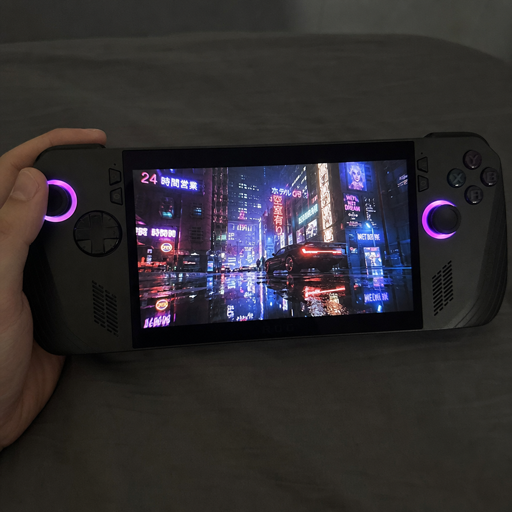
Handheld ray-tracing gaming brings console-style lighting effects to devices built for the couch, commute, hotel room, or wherever a player happens to be. It blends the convenience of handheld gaming with more cinematic visuals, but it also asks a lot from a compact machine. To get the best mobile gaming experience, players need to understand what ray tracing improves, what it costs, and how to balance visual quality with smooth gaming performance.
What does handheld ray-tracing gaming actually mean?
Handheld ray-tracing gaming means playing games on a portable device that can render advanced lighting effects such as realistic reflections, shadows, and global illumination. Instead of relying only on traditional lighting tricks, ray tracing follows how light might behave in a scene, helping metal, glass, water, neon signs, and dark interiors look more believable. On a handheld, the goal is not always to max out every setting; it is to make compact gaming feel richer without sacrificing playability.
Ray tracing is often associated with large desktops and living-room consoles, but the idea is increasingly relevant to portable systems. Handhelds have smaller screens, tighter thermal limits, and limited battery capacity, so the technology has to be used carefully. A subtle reflection setting or a lower-cost lighting mode can make a bigger practical difference than pushing every effect to its highest option.
For players, the value is simple: better atmosphere in a device that still fits in a bag. A horror game can feel moodier, a racing game can gain more convincing reflections, and a sci-fi city can glow with more natural light. The trick is knowing when those upgrades are worth the performance tradeoff.
The appeal of cinematic visuals in a portable format
The strongest promise of mobile ray tracing is immersion. Handheld screens are smaller, which can actually make visual details feel dense and polished when the image is well tuned. A compact display does not need the same extreme resolution as a large monitor to look sharp, so developers and players can sometimes prioritize lighting, contrast, and frame stability instead.
This is where handheld gaming has changed. Portable play used to mean accepting a clear visual downgrade in exchange for convenience. Today, many players expect gaming on-the-go to feel close to their main setup: quick resume, strong controls, high-quality screens, and enough power to run ambitious games with smart settings.
Ray tracing supports that shift because it improves the mood of a scene rather than simply adding more objects or sharper textures. When used well, it can make familiar environments feel more grounded. Reflections on wet pavement, softer shadow edges, and light bouncing through a room can help a small screen deliver a surprisingly premium experience.
The tradeoffs that shape portable ray tracing
Ray tracing is demanding because it adds extra lighting calculations on top of everything else a game already has to do. A handheld device has less room for cooling than a desktop tower and less power available than a plugged-in console. That means every visual upgrade competes with battery life, frame rate, heat, and fan noise.
This does not make handheld ray-tracing gaming impractical. It simply changes the target. Instead of chasing the highest possible settings, the better goal is a balanced profile that looks good, feels responsive, and remains comfortable for the length of a typical session.
Key tradeoffs include:
- Frame rate vs. lighting quality: Higher ray tracing settings can reduce frames per second, especially in busy scenes. Many players will prefer a stable frame rate over slightly better reflections.
- Battery life vs. visual ambition: More demanding effects usually draw more power. For travel, a lower ray tracing preset may be smarter than a short burst of maximum quality.
- Heat vs. comfort: A handheld is touched directly, so thermal behavior matters. A setting that looks great but makes the device hot may not be enjoyable.
- Resolution vs. effects: Lowering resolution or using upscaling can free performance for ray tracing. On a smaller screen, this compromise may be less noticeable.
- Input responsiveness vs. cinematic presentation: Competitive games benefit from fast response times, while slower single-player titles can tolerate heavier visuals more gracefully.
The best setting is not the most expensive one. It is the one that supports the kind of game being played.
Where mobile ray tracing makes the biggest difference
Not every game benefits from ray tracing in the same way. Some visual styles rely more on art direction, animation, or clean readability than realistic light behavior. Others are transformed by reflections, shadows, and indirect light.
Ray tracing tends to matter most in games with reflective surfaces, dramatic lighting, or dense indoor environments. A rain-soaked city, a metallic spaceship corridor, or a candlelit room can show the effect clearly. In these scenes, light is part of the storytelling, not just a technical feature.
It may matter less in bright outdoor games, stylized platformers, strategy games, or competitive shooters where clarity and speed are more important than cinematic lighting. That does not mean the effect is useless, only that the benefit may be subtle compared with the performance cost.
A practical way to judge it is to toggle the setting on and off in the same location. If the scene immediately feels deeper, more natural, or more atmospheric, ray tracing may be worth keeping. If the difference is hard to notice during normal play, performance mode may be the better choice.
How can players balance visuals and gaming performance?
Players can balance visuals and gaming performance by treating ray tracing as one part of a complete settings profile rather than a single on-or-off decision. Start with the frame rate target that feels good, then adjust resolution, upscaling, shadows, reflections, and power mode around that target. If the game still feels smooth and the device stays comfortable, ray tracing can be a worthwhile part of the mobile gaming experience.
A simple tuning process helps avoid endless menu changes:
- Choose the type of session. If you are plugged in at home, you may accept higher settings. If you are traveling, prioritize battery life and stability.
- Set a realistic frame target. Decide whether the game feels best at a higher frame rate or with a more cinematic cap. Slower games can often feel fine at lower, stable frame rates.
- Use upscaling if available. Upscaling can help preserve image quality while reducing the internal rendering workload.
- Test ray tracing one feature at a time. Reflections, shadows, and lighting can have different performance costs. Keep the effect that adds the most visible value.
- Watch comfort, not just numbers. If the handheld becomes too warm, loud, or inconsistent, reduce the load.
- Save separate profiles when possible. A plugged-in visual profile and a battery-friendly travel profile can make gaming on-the-go easier.
This approach is more useful than copying a generic preset. Every game handles lighting differently, and every player has a different tolerance for frame drops or reduced battery life.
Compact gaming rewards smart optimization
Compact gaming is all about efficiency. A handheld does not need to win a raw power contest to feel impressive; it needs to use its resources intelligently. That is why ray tracing on a portable device works best when supported by good scaling, sensible presets, and a screen that flatters the final image.
Smaller screens can hide some compromises. A resolution drop that might look obvious on a large monitor can look acceptable on a handheld, especially when the game uses strong anti-aliasing or upscaling. This gives players room to keep a tasteful ray tracing effect enabled without making the entire image feel soft.
At the same time, handhelds expose other weaknesses more clearly. Inconsistent frame pacing can be distracting when the device is close to the hands and eyes. Fan noise can break immersion in a quiet room. Battery drain can turn a promising portable setup into something that only works near an outlet.
The lesson is that optimization should be judged as a whole. A great handheld profile is not just beautiful in a screenshot. It feels stable after twenty minutes, remains comfortable in the hands, and supports the way the player actually uses the device.
Ray tracing is not the only path to better visuals
It is easy to treat ray tracing as the ultimate visual feature, but it is only one tool. Texture quality, screen contrast, HDR support where available, art direction, animation, and stable performance can all matter just as much. A game with excellent traditional lighting can look better than a poorly optimized ray-traced mode.
For handheld users, this perspective is especially important. The best mobile gaming experience often comes from balance rather than maximum fidelity. A clean image, readable interface, and smooth controls can do more for enjoyment than a reflection that is technically accurate but barely noticeable while playing.
Players should also consider genre. In a narrative adventure, ray-traced lighting can add emotional weight to a scene. In a fast multiplayer match, visual clarity and input response may be more valuable. In an open-world game, a stable performance profile can make exploration feel better than a high-end lighting mode that struggles in cities or weather-heavy areas.
A useful rule is to upgrade what you actually notice. If ray tracing improves the scenes you spend time looking at, keep it. If it only looks impressive in still comparisons, spend the performance budget elsewhere.
What should buyers look for in a ray-tracing handheld?
Buyers should look for a handheld that balances graphics capability, cooling, battery life, display quality, controls, and software support. Ray tracing support alone does not guarantee a better experience, because the device still needs enough headroom to run games smoothly. A strong handheld ray-tracing gaming setup is defined by practical performance, not just a spec sheet.
Before choosing a device, consider these points:
- Graphics support: Look for hardware and software features that support modern rendering techniques, including ray tracing and upscaling.
- Display quality: A good screen can make lighting improvements easier to appreciate. Contrast, brightness, color, and refresh rate all affect the final result.
- Thermal design: Cooling matters because sustained performance is more important than a short peak.
- Battery capacity and power modes: Portable play depends on flexible settings that let you choose between performance and endurance.
- Controls and ergonomics: A beautiful game is less enjoyable if the device feels awkward after a long session.
- Game compatibility: Check whether the games you care about run well on the platform and whether they offer useful graphics options.
- Docking or external display options: Some players want one device for handheld play and occasional big-screen use.
This checklist keeps the focus on real use. If the goal is gaming on-the-go, portability and comfort should carry as much weight as headline graphics features.
Developers will decide how good portable ray tracing feels
Hardware matters, but developers play a huge role in whether mobile ray tracing feels worthwhile. A well-designed ray-traced mode gives players meaningful choices and scales gracefully across different power levels. A poorly designed one can feel like a checkbox that hurts performance without improving the game enough.
Good portable settings usually include clear presets, separate controls for different ray tracing effects, and explanations of what each option changes. This helps players make informed decisions instead of guessing. It also respects the reality that handheld users play in different conditions: on battery, plugged in, docked, offline, commuting, or relaxing at home.
Developers can also design with smaller screens in mind. Interface readability, contrast, and motion clarity are essential. Ray tracing should support the art direction rather than bury it under effects that make the image harder to read.
As portable hardware improves, the most successful games will likely be those that treat handhelds as a serious platform, not an afterthought. The technology is exciting, but thoughtful implementation is what makes it feel seamless.
Practical settings for a better on-the-go experience
A few small habits can make handheld ray-tracing gaming more enjoyable. These tips are not about chasing perfect benchmarks; they are about building a reliable routine that works across many games.
Try this quick setup checklist before a longer session:
- Lower ray tracing from ultra to medium or low first. The visual difference may be modest, while the performance gain can be meaningful.
- Cap the frame rate when needed. A stable cap can feel smoother than a higher frame rate that constantly rises and falls.
- Reduce the heaviest effects before lowering everything. Reflections, shadow quality, crowd density, and volumetric effects often have large performance costs.
- Use headphones in noisy environments. Audio immersion can make a portable session feel more cinematic without adding graphics load.
- Dim the screen slightly when practical. This can help battery life, especially during travel.
- Keep the device ventilated. Avoid blocking vents with blankets, cases, or soft surfaces.
- Create a travel preset. Save settings that are dependable on battery so you are not adjusting menus every time you leave home.
These small choices help ray tracing fit the handheld format. The result is a device that feels capable, flexible, and ready for real-world play rather than only ideal conditions.
The future of handheld visuals is balanced, not excessive
The future of handheld ray-tracing gaming is not about forcing desktop-level settings into a smaller shell at any cost. It is about smarter rendering, better scaling, more efficient chips, and games that understand portable play. When all of those pieces work together, handheld gaming can deliver surprisingly rich visuals without losing what makes it convenient.
Players should expect the category to keep improving, but the core decision will remain the same: choose the settings that make the game feel best in your hands. Sometimes that means enabling mobile ray tracing for atmosphere. Sometimes it means turning it down to protect battery life, comfort, and responsiveness.
The best portable experience is not defined by a single graphics feature. It comes from balance: strong gaming performance, thoughtful visual settings, comfortable hardware, and the freedom to play where you want. Ray tracing can be a powerful part of that mix, as long as it serves the game instead of overpowering it.
