
AI coding assistants are no longer just autocomplete plugins. In 2026, the real decision is whether your team needs fast in-editor help, an agent that can work across a repository, or a governed enterprise setup for regulated code. This comparison explains where the market is going, how the main categories differ, and which option fits different teams without assuming every developer should use the same tool.
Which AI coding assistant model fits your team?
The best fit depends on your risk profile, codebase complexity, and workflow maturity. Individual developers and small product teams usually benefit most from low-friction IDE assistants that improve daily code generation, test writing, and debugging. Larger engineering groups, especially in finance, healthcare, defense, and enterprise SaaS, should compare AI coding tools less by “smartest model” and more by governance, auditability, deployment options, and how safely the tool handles proprietary source code.
|
Team or use case |
Best-fit category |
Why it fits |
Watch-outs |
|---|---|---|---|
|
Solo developer or startup prototype |
General-purpose coding assistant |
Fast setup, strong autocomplete, chat, refactoring, and framework help |
Easy to overtrust generated code |
|
Product engineering team |
IDE-native AI developer tools |
Fits existing pull request, testing, and review workflows |
Requires coding standards and review rules |
|
Large enterprise |
Governed assistant with admin controls |
Better policy management, access control, and data handling options |
Procurement and configuration take longer |
|
Regulated industry |
Privacy-first or private deployment option |
Supports stricter controls around sensitive data and source code |
May trade off convenience or model choice |
|
Platform or infrastructure team |
Agentic coding tool |
Can inspect multiple files, run commands, draft changes, and support migrations |
Needs sandboxing, test discipline, and human approval |
|
Learning, documentation, and onboarding |
Chat-first assistant |
Explains unfamiliar systems and reduces context-switching |
Explanations can be incomplete or confidently wrong |
The future of AI Coding Assistants is therefore not one universal product. It is a stack: autocomplete for flow, chat for explanation, agents for multi-step work, and governance for trust.
The market is shifting from autocomplete to accountable agents
The AI coding assistants market size 2025 is widely reported as already significant, though estimates vary by analyst methodology and category definition. Grand View Research places the global AI code assistants market at about USD 8.5 billion in 2025, with a forecast of continued expansion through 2033. That growth lines up with developer behavior: Stack Overflow’s 2026 survey data shows 65.9% of respondents saying they use AI coding assistants or coding agents at work, making these tools a mainstream part of software development rather than a side experiment.
But adoption does not equal blind trust. Stack Overflow’s 2025 findings showed rising AI use alongside lower trust in AI output, with 46% of developers saying they did not trust the accuracy of AI-generated answers. That tension explains the next phase of the market: teams want better code generation AI, but they also want review gates, source transparency, secure context handling, and clear accountability when generated code touches production systems.
This is why the phrase “best AI coding assistants 2026” is less useful than it sounds. The best tool for a JavaScript-heavy startup may be the wrong choice for a healthcare platform handling protected health information. The future belongs to AI developer tools that can prove where they fit, what data they process, and how they help teams ship safer code rather than merely more code.
Category comparison: the main AI coding assistant options
Most AI coding tools now share familiar features: autocomplete, chat, code explanation, unit test generation, refactoring suggestions, and documentation help. The real differences show up in autonomy, context depth, security posture, ecosystem fit, and how much control administrators get.
|
Category |
Typical strengths |
Best for |
Main limitation |
|---|---|---|---|
|
IDE copilots |
Fast suggestions, inline completions, low workflow disruption |
Everyday development inside VS Code, JetBrains IDEs, Visual Studio, or similar tools |
May struggle with broad architectural changes unless paired with repo context |
|
AI code editors |
Deep project context, chat plus edits, repository-aware workflows |
Teams willing to adopt a more AI-centered editing experience |
Switching editors can create friction |
|
Terminal and cloud coding agents |
Multi-step tasks, test running, file edits, issue-to-PR workflows |
Refactors, migrations, bug fixing, and maintenance work |
Requires sandboxing and careful permission management |
|
Enterprise privacy-first assistants |
Stronger controls around retention, training, and deployment |
Regulated or IP-sensitive organizations |
May limit model flexibility or require more setup |
|
Cloud-provider assistants |
Strong integration with a specific cloud ecosystem |
AWS, Azure, or cloud-heavy teams |
Most valuable when the team is already committed to that ecosystem |
|
General AI chat tools |
Broad reasoning, explanation, and brainstorming |
Learning, debugging concepts, quick snippets |
Weakest when detached from real repository state |
In practical terms, teams should evaluate AI coding assistants the same way they evaluate CI/CD, security scanning, or observability tools. A brilliant demo is not enough. The assistant must fit the team’s repository structure, compliance obligations, developer habits, and release process.
Side-by-side comparison of leading AI coding tools
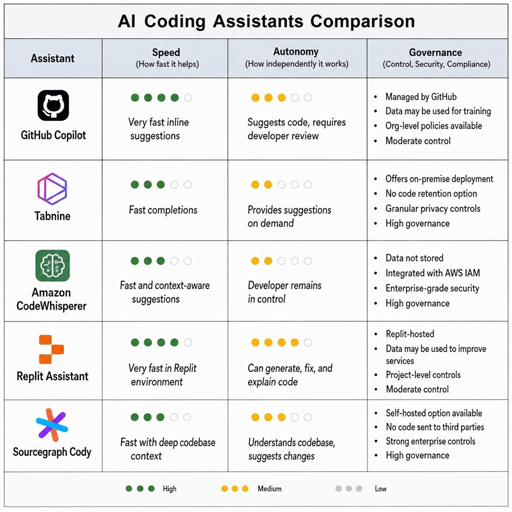
The tools below represent different approaches rather than a fixed ranking. Feature sets change quickly, so the safest comparison is by buying logic: who should consider each tool, what it is strongest at, and what due diligence matters before rollout.
|
Tool or platform |
Positioning |
Strongest fit |
Data and governance notes |
Best reason to choose it |
|---|---|---|---|---|
|
GitHub Copilot |
Broad IDE and GitHub-native assistant |
Teams already using GitHub and pull requests heavily |
GitHub states Copilot Business and Enterprise customer data is not used to train AI models. |
Mature ecosystem, familiar developer workflow, strong collaboration fit |
|
Cursor |
AI-first code editor |
Developers who want chat, codebase context, and edits in one workspace |
Cursor documents Privacy Mode and notes that code in Privacy Mode is not used for training by Cursor or model providers, while some models may have retention outside ZDR agreements. |
High-productivity editor experience for AI-heavy workflows |
|
OpenAI Codex |
Agentic coding through ChatGPT, CLI, IDE, and cloud workflows |
Teams experimenting with long-running coding tasks and cloud-based agents |
OpenAI describes Codex Cloud as running tasks in the cloud and applying organization Agent Security settings for network restrictions. |
Strong agent model for multi-step engineering work |
|
Claude Code |
Terminal-oriented agentic coding |
Developers who prefer command-line workflows and repository-level assistance |
Anthropic says Claude Code data handling depends on the workspace arrangement; API and data retention docs describe ZDR, HIPAA readiness, and separate retention models. |
Strong fit for agentic coding inside existing terminal habits |
|
Amazon Q Developer |
AWS-integrated coding and cloud assistant |
AWS-centric teams building, modernizing, or operating cloud workloads |
Amazon Q stores questions, responses, and context such as metadata and code to generate responses, according to AWS documentation. |
Useful when coding help and AWS operational knowledge should live together |
|
Tabnine |
Privacy-focused AI code assistant |
Enterprises that prioritize no-train/no-retain positioning and private deployment options |
Tabnine states it has a no-train-no-retain policy and that context is deleted after inference when using Tabnine models. |
Strong privacy-first positioning for proprietary codebases |
|
JetBrains AI Assistant |
IDE-native assistant for JetBrains users |
Kotlin, Java, Python, PHP, .NET, and polyglot teams already using JetBrains IDEs |
JetBrains explains that prompts, source fragments, and context may be sent to cloud LLM services, and detailed data collection settings affect storage. |
Natural fit for teams deeply invested in JetBrains workflows |
This table intentionally avoids calling one option the universal winner. “Best” depends on whether your bottleneck is code speed, code review, onboarding, migration work, security policy, or developer experience.
Which option is safer for sensitive data and regulated teams?
For regulated teams, the safest option is usually the one with the clearest contractual data handling, admin controls, retention terms, and deployment model—not necessarily the one with the most impressive code generation demo. Healthcare tech companies using ai coding assistants sensitive data privacy concerns should start with a vendor review that covers training use, prompt retention, repository indexing, subprocessors, access controls, audit logs, and whether protected or confidential data is allowed under the product terms.
A regulated team should compare tools on the same security criteria every time:
|
Security criterion |
What to ask vendors |
Why it matters |
|---|---|---|
|
Training use |
Are prompts, code snippets, completions, chat logs, or repository indexes used to train models? |
Prevents proprietary or regulated data from entering future model training |
|
Retention |
How long are prompts, outputs, session logs, and indexed code retained? |
Determines exposure window after a sensitive prompt or file is submitted |
|
Deployment |
Is SaaS, VPC, on-premises, or air-gapped deployment available? |
Affects whether sensitive code can remain within controlled infrastructure |
|
Access control |
Can admins restrict models, repositories, users, and features? |
Reduces accidental exposure and supports least privilege |
|
Auditability |
Are actions, prompts, file edits, and agent activity logged? |
Helps security teams investigate issues and prove policy compliance |
|
Context control |
Can teams exclude files, secrets, generated artifacts, or regulated datasets from indexing? |
Prevents oversharing and keeps assistants focused on safe context |
|
Legal fit |
Does the vendor support the organization’s compliance obligations? |
Product marketing is not a substitute for contract review |
For some organizations, Tabnine-style privacy positioning or private deployment will be appealing. For others, GitHub Copilot Business or Enterprise may fit because the team already manages source control, identity, and pull requests in GitHub. AWS-heavy teams may prefer Amazon Q Developer because it connects coding assistance with cloud service context, while teams building agentic workflows may evaluate OpenAI Codex or Claude Code with extra attention to sandboxing, retention, and network access.
The key is to avoid a casual rollout. A healthcare or financial services company should not treat an AI coding assistant like a browser extension installed by individual preference. It should be governed like any tool that can read proprietary code, generate production changes, and influence security-relevant implementation decisions.
Agentic tools are changing what “coding assistant” means
Older AI coding assistants mostly completed lines, suggested functions, and answered questions. Newer tools increasingly behave like agents: they inspect a repository, make changes across files, run tests, summarize diffs, and prepare pull requests. OpenAI’s Codex materials describe a cloud-based coding agent that can work in a repository environment, while Anthropic’s Claude Code documentation and retention materials show how terminal-based coding agents are becoming a distinct enterprise concern.
That shift changes the buying decision. A passive autocomplete tool can produce bad code, but an agent with file-system, network, package manager, or CI access can also make broad changes quickly. The productivity upside is larger, and so is the need for guardrails.
|
Assistant generation |
What it does |
Developer role |
Main risk |
|---|---|---|---|
|
Autocomplete |
Suggests next lines or functions |
Accept, reject, edit |
Subtle bugs or insecure snippets |
|
Chat assistant |
Explains, generates, debugs, and refactors on request |
Prompt, verify, adapt |
Hallucinated APIs or incomplete context |
|
Repo-aware editor |
Uses project context to suggest multi-file edits |
Review diffs and tests |
Overbroad changes or hidden assumptions |
|
Coding agent |
Plans and executes tasks with tools |
Define scope, approve actions, review output |
Excessive autonomy without sandboxing |
|
Team-governed agent |
Operates under policy, logs, tests, and approvals |
Supervise outcomes and enforce standards |
Governance gaps if policies are weak |
The future is not “AI replaces developers.” It is closer to “developers manage more automated work.” The valuable skill shifts from typing every line to setting constraints, reading diffs, designing tests, and understanding architecture well enough to know when the assistant is wrong.
Which tool is better for speed, quality, and maintainability?
For raw speed on small tasks, IDE copilots and AI-first editors often win because they stay close to the developer’s immediate context. For quality and maintainability, the winner is usually the tool that works best with your tests, review standards, and repository conventions. An agent that can run tests and update multiple files may outperform autocomplete on migrations, but it can also create larger mistakes if the task is poorly scoped.
Use this decision matrix rather than relying on vendor demos:
|
Criterion |
IDE copilot |
AI-first editor |
Agentic coding tool |
Enterprise privacy-first assistant |
|---|---|---|---|---|
|
Setup speed |
High |
Medium |
Medium |
Lower |
|
Day-to-day flow |
High |
High |
Medium |
Medium to high |
|
Multi-file changes |
Medium |
High |
High |
Varies |
|
Test generation |
Medium to high |
High |
High |
Varies |
|
Large refactors |
Medium |
High |
High |
Varies |
|
Governance |
Varies |
Varies |
Needs strong controls |
High priority |
|
Sensitive code fit |
Depends on plan and settings |
Depends on privacy settings |
Depends on sandboxing and retention |
Strongest fit when configured well |
|
Learning curve |
Low |
Medium |
Medium to high |
Medium |
For most teams, quality depends less on which AI model writes the first draft and more on the workflow around it. Generated code should be reviewed like human code, tested like human code, and scanned like human code. If AI output skips code review, it is not a productivity tool; it is an untracked production risk.
The strongest use cases are practical, repetitive, and reviewable
AI coding assistants perform best when the task is specific, bounded, and easy to verify. They are especially useful when the developer can describe the desired behavior, run tests, and compare output against existing patterns. They are weaker when requirements are ambiguous, business logic is undocumented, or the codebase relies on tribal knowledge.
Strong use cases include:
- Unit and integration test drafts: The assistant can propose coverage quickly, while humans verify edge cases and assertions.
- Boilerplate and scaffolding: Code generation AI is useful for repetitive controllers, serializers, config files, UI components, and scripts.
- Refactoring within a known pattern: Tools can rename, extract, simplify, and modernize code when the target structure is clear.
- Documentation and code explanation: AI developer tools can summarize unfamiliar modules and reduce onboarding friction.
- Bug investigation: Chat and agentic workflows can propose likely causes, inspect related files, and suggest diagnostic steps.
- Migration assistance: Agents can help update dependencies, APIs, syntax, or framework conventions across many files.
Weak or risky use cases include:
- Security-sensitive implementation without expert review: Authentication, authorization, encryption, and data retention logic require specialists.
- Unclear product requirements: AI may fill gaps with plausible but wrong assumptions.
- Regulated data handling: Generated code must reflect legal and compliance obligations, not just functional behavior.
- Performance-critical systems: Suggestions may be correct but inefficient under real workload conditions.
- Legacy systems with hidden side effects: The assistant may miss operational constraints that are not visible in code.
The practical rule is simple: use AI where review is cheap and verification is strong. Avoid giving it unsupervised control where context is incomplete and the cost of failure is high.
Governance is becoming a product feature, not an afterthought
In 2026, enterprise buyers increasingly compare AI coding assistants by governance features. This includes admin policy, data retention, model routing, repository access, logging, identity integration, and whether teams can prevent sensitive files from being indexed or sent as context. The more autonomous the tool, the more important these controls become.
A mature rollout plan should include:
- Acceptable-use rules: Define which repositories, data classes, and tasks are allowed.
- Data classification: Mark secrets, regulated data, customer records, and proprietary algorithms that should not be shared with AI tools.
- Vendor review: Confirm training use, retention, subprocessors, security certifications, and contractual terms.
- Repository controls: Use allowlists, blocklists, secret scanning, and file exclusions.
- Review standards: Require human approval for generated code, especially in security, data, and infrastructure areas.
- Testing requirements: Pair AI-generated changes with automated tests, static analysis, and dependency checks.
- Audit and monitoring: Track adoption, incidents, output quality, and where AI materially affects production code.
- Developer training: Teach prompting, diff review, hallucination detection, and secure coding expectations.
This is where the market is heading. The future of AI coding tools is not only smarter models. It is safer defaults, narrower permissions, clearer audit trails, and assistants that respect enterprise boundaries.
Best-fit recommendations for 2026
If you want a practical shortlist, start by matching the tool to the operating environment rather than chasing a universal winner.
|
If your priority is… |
Start by comparing… |
Decision logic |
|---|---|---|
|
Fast adoption across many developers |
GitHub Copilot, JetBrains AI Assistant, Amazon Q Developer |
Choose the assistant that fits your existing IDE, source control, and cloud ecosystem |
|
AI-first coding experience |
Cursor and similar AI-native editors |
Choose if developers are willing to shift editor habits for deeper AI workflows |
|
Long-running coding tasks |
OpenAI Codex, Claude Code, and agentic tools |
Choose when you can sandbox agents, run tests, and review diffs carefully |
|
Sensitive code and privacy posture |
Tabnine, enterprise plans, private deployment options |
Choose based on retention, training, deployment, and contract terms |
|
AWS development |
Amazon Q Developer |
Choose when cloud knowledge and coding assistance should be connected |
|
Developer onboarding |
Copilot, Cursor, JetBrains AI, chat-based assistants |
Choose tools that explain code well and integrate with existing docs |
|
Regulated software delivery |
Privacy-first and enterprise-governed tools |
Choose only after legal, security, and compliance review |
For many teams, the final answer will be a combination. Developers may use an IDE assistant for flow, a chat tool for explanation, and a coding agent for larger maintenance tasks. The organization’s job is to make that stack coherent rather than letting every team invent its own rules.
The future belongs to teams that pair AI speed with engineering discipline
AI coding assistants will keep improving at code generation, repository reasoning, testing support, and autonomous task execution. The competitive advantage, however, will not come from installing the newest plugin first. It will come from building a development process where AI speeds up routine work while humans remain accountable for architecture, security, product judgment, and maintainability.
The best AI coding assistants in 2026 are not simply the tools that produce the most code. They are the tools that help teams produce better-reviewed, better-tested, and better-governed software. For small teams, that may mean a fast AI editor or copilot. For enterprises, it may mean a privacy-first platform with strict controls. For everyone, the winning approach is the same: let AI draft, investigate, and accelerate, but keep engineering judgment firmly in the loop.
