
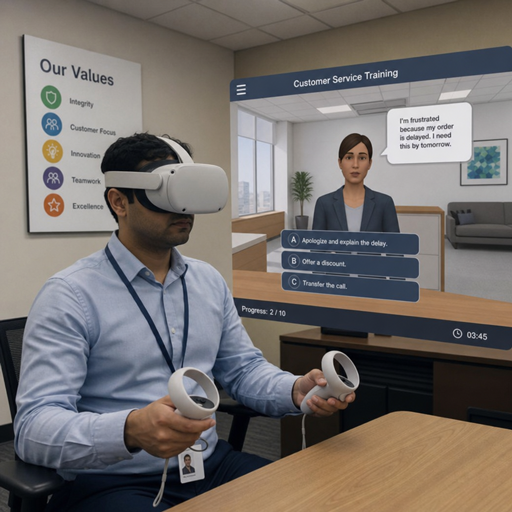
An immersive enterprise metaverse is a shared, three-dimensional layer of the digital workplace where teams can meet, design, train, simulate, and make decisions with a stronger sense of presence than standard video or chat can provide. Spatial workspaces use immersive technology such as VR, AR, mixed reality, 3D environments, and real-time collaboration tools to make distributed work feel more visual, interactive, and context-rich. This guide explains what these environments are, where they create value, and how organizations can approach them without treating the metaverse as a gimmick.
What does a spatial workspace actually do?
A spatial workspace gives people a shared digital place where information, people, and objects can be arranged in three dimensions instead of being flattened into documents, screens, and meeting grids. In practice, that might mean a product team walking around a life-size prototype, a trainer guiding employees through a simulated safety scenario, or executives reviewing a digital twin of a facility before approving a change.
The point is not to replace every meeting with a headset. The point is to match the work to the environment. Some tasks are best handled in a document, some in a quick call, and some benefit from immersive experiences that let people see scale, movement, proximity, and context together.
A mature spatial workspace can support:
- Virtual collaboration where distributed teams feel co-present rather than merely connected.
- 3D visualization for products, buildings, equipment, data, or operational environments.
- Simulation and rehearsal for complex, risky, expensive, or hard-to-repeat scenarios.
- Persistent rooms and assets that remain available after a meeting ends.
- Integrated workflows that connect immersive sessions to the broader digital workplace.
For a virtual enterprise, the value comes from continuity. The spatial environment is not a one-off demo room; it becomes a work layer where people return, build context, and make progress.
Why does immersive technology matter for enterprise work?
Immersive technology matters because many business problems are spatial, social, or experiential, while many digital tools are still built around flat files and fragmented communication. When teams need to understand a physical environment, evaluate a product, practice a procedure, or build trust across distance, a 3D shared experience can communicate information faster and more naturally than slides alone.
Traditional digital collaboration often separates the people from the thing they are discussing. A team reviews an image, opens a spreadsheet, shares a screen, and talks around the work. In an immersive enterprise metaverse, the work can become the place. People can gather around a model, point to the same component, annotate it in real time, and leave notes for the next group.
This shift is especially useful for organizations dealing with complex assets, specialized training, global teams, or high-value decisions. A spatial workspace can reduce ambiguity because it gives teams a common reference point. Instead of asking everyone to imagine the same thing, the environment lets them inspect it together.
There is also a human side. Remote and hybrid teams often struggle with attention, connection, and meeting fatigue. Immersive experiences can create stronger focus because the environment is designed around the task. Used thoughtfully, enterprise VR and related tools can make digital work feel less like watching a screen and more like entering a shared project space.
The building blocks of an immersive enterprise metaverse
An enterprise metaverse is not a single product or a single room. It is an ecosystem of environments, devices, identity systems, content, data, and governance practices that work together. The strongest implementations begin with specific business use cases, then choose the technology stack that supports those needs.
Persistent virtual environments
A persistent environment remains available over time. A team can return to the same project room, see the same layout, review previous annotations, and continue the work instead of starting from scratch. This persistence is what separates a useful spatial workspace from a novelty experience.
For example, a design team might maintain a virtual studio with product versions arranged by release stage. A facilities team might keep a digital operations room with models of equipment, maintenance notes, and training scenarios. Persistence turns the space into a living memory for the team.
Presence, avatars, and spatial audio
Presence is the feeling that other people are truly sharing the environment with you. Avatars, hand gestures, eye direction, and spatial audio all contribute to that feeling. These details may seem cosmetic, but they change how people communicate.
In a standard video meeting, everyone competes for the same rectangle of attention. In a spatial workspace, a person can stand near a model, move toward a group discussion, or step aside for a side conversation. Spatial audio helps people understand who is speaking and where attention is focused. That can make collaboration feel more natural, especially for workshops, training, and brainstorming.
3D assets and digital twins
The usefulness of immersive experiences depends heavily on the quality and relevance of the content. A beautiful empty room does not solve a business problem. The real value comes from models, simulations, data layers, process maps, or digital twins that represent the work.
A 3D asset might be a product prototype, a building layout, a machine, a medical device, a logistics network, or a retail store concept. A digital twin goes further by representing an actual physical asset or system, often with data connected to it. When teams can view and discuss these assets together, they can spot issues, test alternatives, and align decisions earlier.
Workflow and platform integration
Spatial workspaces should connect to the tools employees already use. If a team makes decisions in a virtual environment but must manually copy everything into project software later, adoption will suffer. Integration makes the experience part of the digital workplace rather than an isolated event.
Useful integrations may include calendar systems, identity management, file storage, design tools, learning platforms, analytics dashboards, project management software, and communication channels. The goal is simple: immersive work should create outputs that are easy to capture, share, secure, and act on.
Devices and access modes
Enterprise VR can deliver the highest level of immersion, but not every user or task requires a headset. Some employees may join from a desktop, tablet, browser, mobile device, AR glasses, or a room-scale setup. A flexible access model helps organizations avoid excluding people who lack specific hardware.
The best device strategy usually matches intensity to purpose. A safety simulation may justify full VR. A design review may work with mixed access, where some users enter in VR while others join from desktop. A quick spatial check-in may need only a lightweight 3D interface.
High-value use cases across the virtual enterprise
The strongest business cases for immersive environments usually appear where distance, complexity, risk, or cost make traditional work harder. Instead of asking where the metaverse sounds exciting, ask where people currently struggle to understand, practice, visualize, or coordinate.
Training and skills development
Training is one of the most practical applications of immersive technology. Employees can practice tasks in a realistic environment without the same cost or risk as real-world repetition. This is useful for safety procedures, equipment handling, customer interactions, emergency response, field service, and leadership scenarios.
Immersive training can also support consistency. Every learner can encounter the same environment, the same sequence, and the same performance criteria. Trainers can observe choices, pause scenarios, reset exercises, and provide feedback tied to what the learner actually did.
Product design and engineering
Product teams often need to understand form, scale, ergonomics, assembly, and user interaction. Flat renderings and static presentations can hide issues that become obvious in three dimensions. A spatial workspace lets teams inspect prototypes from multiple angles and discuss changes in context.
This can be especially valuable when teams are distributed across offices, suppliers, and manufacturing locations. Instead of waiting for physical prototypes to circulate, stakeholders can review virtual versions earlier in the process. The result is not magic; it is better shared understanding at a stage when changes may be easier to make.
Facility planning and operations
Facility teams can use immersive environments to review layouts, plan maintenance, train workers, and coordinate changes before they happen on site. A virtual model of a warehouse, factory floor, hospital wing, office, or campus can help teams identify access issues, workflow friction, and safety concerns.
These spaces are also useful for onboarding. New employees can learn how to navigate a facility, locate key areas, and understand procedures before arriving in person. For large or complex locations, that early familiarity can reduce confusion and improve confidence.
Sales, customer experience, and stakeholder engagement
Immersive experiences can help customers and stakeholders understand offerings that are difficult to explain through brochures or slide decks. A manufacturer might guide a buyer through a virtual product configuration. A real estate team might present a planned space before construction. A technology provider might demonstrate an operating environment rather than describing it abstractly.
The key is to make the experience useful, not theatrical. The environment should help the audience compare options, ask better questions, and understand value. If the experience only impresses for a few minutes but does not support a decision, it will not become a reliable enterprise tool.
Collaboration for hybrid and global teams
For teams spread across regions, spatial workspaces can create shared rooms for strategy sessions, design sprints, planning workshops, and executive briefings. The benefit is not merely seeing avatars. It is having a place where ideas, assets, notes, and decisions can be arranged visually.
A virtual collaboration space can be especially helpful when the work involves relationships between objects or concepts. Teams can cluster ideas, map dependencies, walk through a customer journey, or compare scenarios side by side. This makes abstract work more tangible and gives participants more ways to contribute.
Designing immersive experiences that employees will actually use
Immersive experiences succeed when they respect how people work. Employees do not adopt a tool because it is futuristic; they adopt it when it saves effort, improves clarity, or helps them achieve something important. Design should begin with the user’s task, constraints, and environment.
A practical design process includes:
- Define the business moment. Identify the exact task where immersion adds value, such as practicing a repair procedure or reviewing a life-size prototype.
- Choose the right level of immersion. Decide whether the task needs VR, AR, mixed reality, desktop 3D, or a blended access model.
- Map the user journey. Clarify how people enter the space, what they do first, how they collaborate, and what output they take away.
- Reduce cognitive load. Avoid unnecessary visual noise, complicated controls, or oversized environments that distract from the task.
- Connect to the workflow. Make it easy to capture notes, decisions, recordings, scores, or next steps.
- Test with real users. Observe where people hesitate, get confused, or become fatigued, then simplify.
Designers should also consider session length. Immersive environments can be engaging, but they can also demand more attention and physical energy than standard tools. For many enterprise scenarios, shorter focused sessions work better than long open-ended meetings.
A practical checklist for spatial workspace readiness
Before launching a pilot, teams should answer a few grounded questions:
- What problem becomes easier to solve in 3D than in a conventional meeting or document?
- Which users need full immersion, and which can participate through desktop or mobile access?
- What assets, models, or data must be available for the experience to be useful?
- How will identity, permissions, and access be managed?
- What will be captured after the session: decisions, annotations, training results, or action items?
- Who owns updates to the environment after launch?
- How will the organization measure whether the workspace improves the current process?
If these questions are difficult to answer, the project may need a narrower use case. A focused pilot is usually more valuable than a broad environment with unclear purpose.
Enterprise VR and device strategy
Enterprise VR is powerful because it can block out distractions and place the user inside a controlled environment. That makes it well suited for training, simulation, design review, and high-attention workshops. However, a headset-first strategy is not always the best starting point.
Organizations should think in terms of access tiers. Some users may need high-immersion hardware because they are practicing physical movement or inspecting a model at scale. Others may need observation access, review access, or occasional participation. A digital workplace becomes more inclusive when people can choose the right access mode for their role.
Device management also matters. Hardware must be provisioned, updated, cleaned, stored, supported, and secured. Employees need guidance on fit, comfort, safety, and appropriate session length. IT teams need policies for accounts, data handling, network use, and application updates.
A good device strategy avoids both extremes. It does not assume everyone needs expensive immersive hardware immediately, but it also does not water down every use case to the lowest common denominator. The right question is: what level of presence does this task require to create value?
Governance, security, and inclusion in spatial workspaces
An immersive enterprise metaverse introduces familiar digital workplace concerns in a new form. Identity, access control, privacy, data protection, records management, and acceptable use still matter. In some ways, they matter more because immersive environments can involve behavioral data, voice, movement, spatial recordings, and sensitive 3D assets.
Governance should be established early, not added after adoption grows. Employees need to know what is recorded, who can access shared spaces, how assets are classified, and what behavior is expected. Administrators need controls that match enterprise standards.
Important governance areas include:
- Identity and access: Users should enter spaces through approved authentication and role-based permissions.
- Data classification: Sensitive models, customer information, and operational data should be labeled and protected.
- Recording policies: Teams should understand when sessions, voice, movement, or annotations may be captured.
- Asset ownership: Someone must be responsible for maintaining, archiving, and retiring virtual assets.
- Behavior standards: Presence-based environments need clear norms for respectful interaction.
- Accessibility and inclusion: Alternatives should exist for users who cannot or prefer not to use immersive hardware.
Inclusion is not a side issue. Some users may experience motion discomfort, have visual or mobility limitations, lack private space, or work in environments where headsets are impractical. A thoughtful spatial strategy gives people meaningful ways to participate without forcing a single mode of access.
Implementation roadmap for an immersive digital workplace
A successful rollout usually grows from a specific pilot into a repeatable capability. Organizations that begin with a vague ambition to “enter the metaverse” often struggle because the goal is too broad. Teams that begin with a concrete workflow can learn faster and prove value with less risk.
Phase 1: Identify a high-friction workflow
Start by looking for a workflow where current tools create friction. Good candidates include training that is hard to schedule, design reviews that cause misunderstanding, site visits that require travel, or sales demonstrations that are difficult to explain. The problem should be important enough to matter but narrow enough to pilot.
Document the current process before introducing immersive technology. How long does it take? Where do errors, delays, or misunderstandings occur? Who is involved? What outputs are expected? This baseline helps the team judge whether the new experience improves the work.
Phase 2: Build a focused pilot
The pilot should be intentionally limited. Choose one user group, one environment, and one measurable outcome. The experience does not need every feature; it needs the features that support the task.
For example, a pilot for maintenance training might need a realistic equipment model, guided steps, instructor controls, and performance capture. It may not need an elaborate lobby, social zones, or custom avatars. Keeping the scope tight makes it easier to test usability and demonstrate relevance.
Phase 3: Integrate with existing systems
Once the pilot proves useful, connect it more deeply to enterprise systems. Training results may need to flow into a learning platform. Design annotations may need to connect to project files. Meeting outputs may need to move into collaboration channels or task management tools.
This is where the immersive enterprise metaverse becomes operational. The experience stops being a standalone event and becomes part of how work moves through the organization.
Phase 4: Create reusable patterns
As use cases grow, teams should standardize what can be reused. This might include room templates, onboarding flows, interaction patterns, asset libraries, security rules, facilitation guides, and support processes. Reuse lowers the effort required to launch each new workspace.
Reusable patterns also improve the employee experience. If every virtual room behaves differently, users must relearn basic actions every time. Consistency makes immersive tools feel like part of the digital workplace rather than a collection of experiments.
Phase 5: Scale through governance and enablement
Scaling requires more than licenses and devices. It requires training facilitators, supporting users, maintaining content, and clarifying ownership. Teams should know when to use immersive tools, how to request a space, and how to evaluate whether a use case is appropriate.
Enablement is especially important for managers. They need to understand how to lead sessions, include remote participants, manage attention, and capture outcomes. Without good facilitation, even a technically impressive environment can become confusing.
Measuring the value of immersive collaboration
Measurement should connect directly to the workflow being improved. Generic enthusiasm is not enough. Leaders need evidence that immersive collaboration is making work clearer, faster, safer, more engaging, or more effective.
Useful measures may include:
- Reduced need for travel or physical prototypes.
- Faster alignment during design or planning reviews.
- Improved training completion, confidence, or assessment performance.
- Fewer misunderstandings during complex handoffs.
- Stronger engagement in workshops or onboarding sessions.
- Better stakeholder understanding of spatial concepts.
- Shorter time from review to decision.
Not every benefit will be purely quantitative. Teams may also capture qualitative feedback about clarity, confidence, and communication. The important thing is to compare the immersive workflow with the previous workflow, not with an abstract vision of the future.
Leaders should also measure adoption quality. Are people returning to the workspace because it helps, or only because they were asked to attend? Are facilitators becoming more confident? Are outputs being used after sessions end? These signals reveal whether the spatial workspace is becoming part of real work.
Common mistakes to avoid
Many immersive workplace projects fail for ordinary reasons, not futuristic ones. The technology may be impressive, but the use case is vague. The environment may look polished, but it does not connect to the workflow. The pilot may excite executives, but employees find it inconvenient.
Avoid these common mistakes:
- Starting with a platform instead of a problem. Technology selection should follow the workflow, not lead it.
- Building too much too early. Large virtual campuses can become empty if no specific work happens there.
- Ignoring non-headset users. A headset-only approach can limit participation and slow adoption.
- Underestimating content maintenance. 3D assets, rooms, and simulations need owners and update cycles.
- Skipping facilitation. Immersive sessions need clear agendas, roles, and outputs.
- Treating security as an afterthought. Sensitive enterprise assets require governance from the beginning.
- Measuring novelty instead of outcomes. Excitement after a demo does not prove long-term value.
The best projects feel almost modest at first. They solve a real problem, serve a defined audience, and improve through feedback. Over time, those focused wins create the foundation for a broader virtual enterprise strategy.
The future of spatial work is practical, not performative
The future of immersive work will not be defined by whether every employee spends the day inside a virtual world. It will be defined by whether organizations can use spatial computing where it genuinely improves understanding, collaboration, and performance. The enterprise metaverse becomes meaningful when it helps people do work they already care about in a clearer and more connected way.
For some teams, that means enterprise VR training that prepares employees for rare or risky situations. For others, it means a shared 3D design room, a digital twin operations center, or a customer experience that makes complex offerings easier to grasp. The common thread is practical value.
Organizations that approach immersive technology with discipline will be better positioned than those chasing broad hype. Start with the work. Choose the right level of immersion. Design for inclusion and governance. Connect the environment to the digital workplace. Then scale what proves useful.
The immersive enterprise metaverse is not a replacement for human collaboration. At its best, it is a richer canvas for it: a place where distributed people can gather around shared context, explore possibilities, and make better decisions together.